Introduction
ClickHouse® Text Indexes make it easier to search large volumes of free-form
text efficiently. A single log message can contain many searchable terms, and
scanning the original String column for every query becomes increasingly
expensive as the data grows.
This is where ClickHouse Text Indexes come in.
A Text Index is an inverted index that maps tokens to the rows containing them. Instead of treating the entire string as one value, ClickHouse tokenizes the text and builds searchable structures over those tokens. At query time, ClickHouse can use these structures to identify matching rows without scanning every text value.
ClickHouse® introduced its native Text Index to make token-based text search more efficient at scale. The implementation reached experimental status in ClickHouse 25.9, beta in 25.12, and became production-ready in 26.2.
This article takes a practical look at how the Text Index works, how tokenizers and preprocessors determine what gets indexed and searched, how different parameters affect its behavior, and how these choices impact query performance, indexing cost, and real-world use cases.
What Is a ClickHouse® Text Index?
A Text Index is an inverted index designed for searching text efficiently.
Instead of scanning every row and checking the complete string, ClickHouse builds a mapping between tokens and the rows containing those tokens.
For example, consider this table:
CREATE TABLE articles
(
id UInt64,
content String
)
ENGINE = MergeTree
ORDER BY id;
Suppose the data contains:
1 → ClickHouse is fast
2 → ClickHouse is scalable
3 → PostgreSQL is relational
A text index conceptually creates mappings such as:
clickhouse → rows 1, 2
fast       → row 1
scalable   → row 2
postgresql → row 3
relational → row 3
When we search for ClickHouse, ClickHouse can use the index to find
the relevant rows instead of scanning the complete content column.
This is the fundamental difference between a text index and a normal full-column scan.
How Does the Text Index Work?
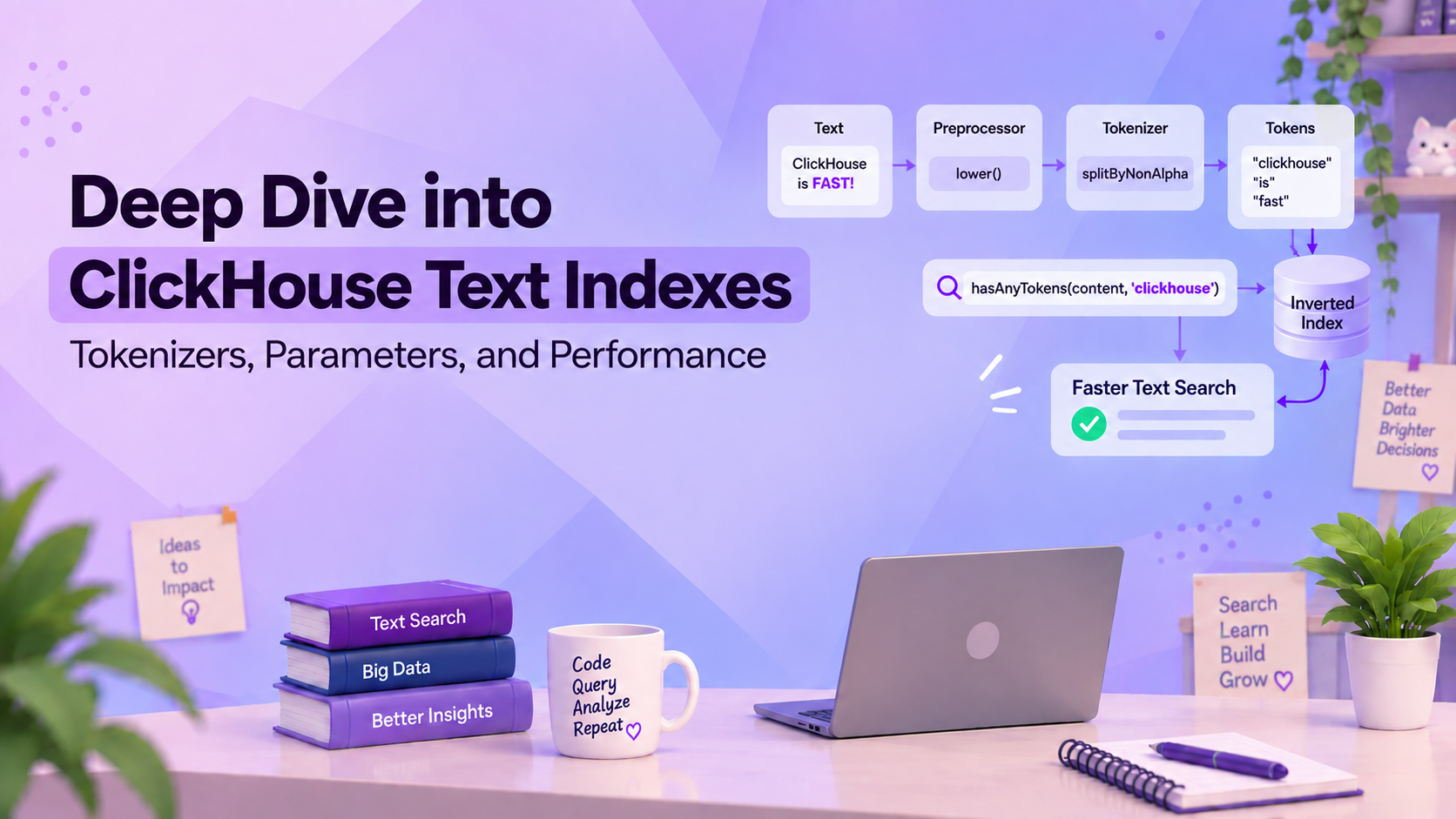
A ClickHouse Text Index works by converting text into searchable tokens and storing those tokens in an inverted index.

For example, consider:
"ClickHouse is FAST!"
With a lowercase preprocessor:
"clickhouse is fast!"
Then, using splitByNonAlpha, the text is tokenized as:
["clickhouse", "is", "fast"]
The generated tokens are stored in an inverted index. The index maintains a dictionary of tokens and posting lists that point to the positions where those tokens occur. During a query, ClickHouse uses this information to identify relevant data instead of scanning the entire text column.
Creating a Text Index
Consider a simple article table:
CREATE TABLE articles
(
id UInt64,
content String,

INDEX content_idx(content)
TYPE text(
tokenizer = 'splitByNonAlpha',
preprocessor = lower(content)
)
)
ENGINE = MergeTree
ORDER BY id;
The index definition determines how the text is transformed and stored. Therefore, changing the tokenizer or preprocessor can change both search behavior and index cost.
Insert a few rows:
INSERT INTO articles VALUES
(1, 'ClickHouse provides FAST analytical queries'),
(2, 'Database indexing improves query performance'),
(3, 'ClickHouse is useful for logs and observability'),
(4, 'Full text search is useful for large datasets');
Two important configurations are used here:
tokenizer = 'splitByNonAlpha'
This controls how the input is divided into tokens.
preprocessor = lower(content)
This transforms the input before tokenization.
For example:
ClickHouse provides FAST analytical queries
↓
clickhouse provides fast analytical queries
↓
["clickhouse", "provides", "fast",
"analytical", "queries"]
Now we can search using:
SELECT id, content
FROM articles
WHERE hasAnyTokens(content, 'CLICKHOUSE');
Because hasAnyTokens uses the same configured preprocessing and
tokenization for the search string, CLICKHOUSE is normalized and can
match the indexed clickhouse token.
This is an important benefit of defining the preprocessor as part of the Text Index.
Understanding Text Index Parameters
The Text Index definition controls how text is processed and indexed.
The main configuration options are:
tokenizer: determines how text is split into searchable tokens.preprocessor: transforms the text before tokenization.- Tokenizer-specific parameters : control details such as separators or gram lengths.
For example:
INDEX content_idx(content)
TYPE text(
tokenizer = 'splitByNonAlpha',
preprocessor = lower(content)
)
These settings affect what can be searched, index size, and query performance. The following sections look at tokenizers and preprocessors in more detail.
Understanding Tokenizers
The tokenizer determines what becomes searchable.
For example, should:
clickhouse-cloud
be treated as one value, two words, or several overlapping character sequences?
The answer depends on the tokenizer. ClickHouse currently supports these main Text Index tokenizers:
| Tokenizer | Behavior | Good fit |
|---|---|---|
splitByNonAlpha | Splits on non-alphanumeric characters | Logs, reviews, normal text |
splitByString | Splits using specified separators | Structured or delimited strings |
ngrams | Creates fixed-length character sequences | Partial-word or substring search |
sparseGrams | Creates variable-length sparse grams | Efficient substring-oriented search |
array | Treats array elements as tokens | Tags and Array(String) data |
Let's see how the most important ones behave.
1. splitByNonAlpha --- Word-Based Search
splitByNonAlpha splits text whenever it encounters a non-alphanumeric
character.
For example:
Input:
"ERROR: ClickHouse-query failed!"
↓
["ERROR", "ClickHouse", "query", "failed"]
Configure it as:
INDEX message_idx(message)
TYPE text(tokenizer = 'splitByNonAlpha')
This tokenizer is a good fit when users normally search for complete words, such as:
Database connection timeout
User authentication failed
ClickHouse query completed
For example:
SELECT *
FROM logs
WHERE hasAllTokens(message, 'database timeout');
This searches for rows containing both database and timeout.
splitByNonAlpha is therefore a natural starting point for logs,
comments, reviews, messages, and other word-oriented text.
2. splitByString --- Delimiter-Based Search
Sometimes the data has a known separator that defines the boundaries between meaningful values.
For example:
ERROR,Database,Connection,Timeout
If the comma is the separator, configure the tokenizer accordingly:
INDEX message_idx(message)
TYPE text(tokenizer = splitByString(','))
Conceptually:
ERROR,Database,Connection,Timeout
↓
["ERROR", "Database", "Connection", "Timeout"]
Unlike splitByNonAlpha, splitByString lets you define the separator
used to split the text.
This makes it useful for structured strings, CSV-like data, custom log formats, and other delimiter-based text. ClickHouse also supports multiple custom separators with this tokenizer.
3. ngrams --- Partial-Word Search
Word-based tokenization is not always enough. Some applications need to find a value using only part of a word.
For example:
ClickHouse
A search for:
house
is a substring search rather than a complete-word search.
The ngrams tokenizer breaks text into overlapping sequences of
characters.
For example:
Input:
"hello"

ngrams(3):

["hel", "ell", "llo"]
Configure it as:
INDEX name_idx(name)
TYPE text(
tokenizer = ngrams(3),
preprocessor = lower(name)
)
The n-gram size can be configured from 1 to 8, with 3 as the
default.
ngrams is useful for:
- Partial-word searches
- Product names
- Technical terms
- Identifiers
- Substring searches
The trade-off is index size. Because overlapping character sequences
generate more tokens, an n-gram index is generally larger than a
word-based index such as splitByNonAlpha.
So, ngrams is best used when partial matching is actually
required, rather than as the default tokenizer.
4. sparseGrams —-- Selective Substring Search
sparseGrams is designed for substring-oriented searches. Unlike
ngrams, which generates fixed-length grams, sparseGrams selects a
sparse set of variable-length grams.
For example, with:
sparseGrams(3, 20, 5)
ClickHouse generates selected grams based on its sparse-gram algorithm rather than generating every possible substring.
A Text Index can be configured as:
INDEX text_idx(text)
TYPE text(
tokenizer = sparseGrams(3, 20, 5)
)
The parameters control the gram selection:
sparseGrams(
min_length,
max_length,
min_cutoff_length
)
During search, ClickHouse can use longer and more specific grams while ignoring shorter grams that are already covered. This can reduce the amount of index work for substring searches.
sparseGrams can be useful for long technical strings, URLs,
identifiers, code, and other data where users frequently search by
substrings.
The key difference is:
ngrams
↓
Fixed-length grams

sparseGrams
↓
Variable-length, selective grams
Both are designed for substring-style searches, but they have different trade-offs in index size, indexing cost, and query performance.
5. array --- Already Tokenized Data
Sometimes the data is already stored as tokens.
For example:
tags Array(String)
with a value such as:
[
"clickhouse",
"database",
"real-time analytics"
]
In this case, splitting the strings again may not be desirable.
Use:
INDEX tags_idx(tags)
TYPE text(tokenizer = 'array')
Each array element is treated as a token.
That means:
"real-time analytics"
can remain one token rather than being divided into several words.
This makes array particularly useful for:
- Tags
- Categories
- Labels
- Pre-tokenized data
What About the Preprocessor?
The preprocessor runs before the tokenizer.
For example:
preprocessor = lower(message)
transforms:
"ClickHouse ERROR"
↓
"clickhouse error"
before the tokenizer processes it.
Preprocessors can do more than lowercase text. ClickHouse allows deterministic expressions, so preprocessing can also be used for operations such as removing accents, extracting text from HTML, or normalizing input before indexing.
For example:
INDEX message_idx(message)
TYPE text(
tokenizer = 'splitByNonAlpha',
preprocessor = lower(message)
)
The important order is:
Original text
↓
Preprocessor
↓
Tokenizer
↓
Text Index
The preprocessor controls how the input is normalized, while the tokenizer controls how that normalized input is divided into searchable tokens.
Searching with a Text Index
Creating a Text Index is only the first step. To take advantage of it during queries, ClickHouse® provides functions designed for token-based text search.
Two useful functions are hasAnyTokens and hasAllTokens.
hasAnyTokens returns rows where at least one of the searched tokens is
present.
For example:
SELECT id, content
FROM articles
WHERE hasAnyTokens(content, 'ClickHouse database');
This can match rows containing either ClickHouse or database.
hasAllTokens is useful when all searched tokens must be present.
For example:
SELECT id, content
FROM articles
WHERE hasAllTokens(content, 'ClickHouse database');
This matches rows containing both ClickHouse and database.
The search text is processed using the same tokenizer and preprocessor configured for the Text Index. This is important because the query and indexed data need to follow the same tokenization rules.
For example, if the index uses:
preprocessor = lower(content)
then searching for CLICKHOUSE can match the indexed clickhouse
token.
The choice between hasAnyTokens and hasAllTokens therefore depends
on the search requirement:
hasAnyTokens → match any searched token
hasAllTokens → match all searched tokens
Checking Text Index Usage
A Text Index is not necessarily used by every text query. The query pattern and index configuration determine whether ClickHouse can use it.
Use EXPLAIN indexes = 1 to check index usage:
EXPLAIN indexes = 1
SELECT * FROM articles
WHERE hasAllTokens(content, 'database performance');
The output shows whether the Text Index is used and how much data can be skipped.
This is useful for testing index configurations and comparing the amount of data read before and after adding the index.
Text Index Performance
The main advantage of a Text Index is reducing the amount of data that needs to be read during text searches.
In ClickHouse's benchmark, a text-search query without a Text Index took about 143 seconds and read around 2.16 billion rows, representing approximately 729 GB of data.
With a Text Index, the same workload took about 0.42 seconds while reading around 335 million rows, or approximately 1.36 GB.
This shows the impact of an inverted index: instead of scanning the entire text column, ClickHouse can use the index to narrow down the data that needs to be read.
However, these results should not be treated as universal. Actual performance depends on factors such as:
- Data volume
- Search selectivity
- Tokenizer
- Query pattern
- Index configuration
- Hardware and storage
There is also a cost to using a Text Index. The index requires additional storage and processing during data ingestion and index creation.
Therefore, the goal is not simply to make the index as large as possible. The goal is to find a configuration where the reduction in query-time data reading justifies the additional indexing and storage cost.
Real-World Use Cases
Text Indexes are useful when you need to search large amounts of text frequently.
Log Search
Search log messages for terms such as:
database timeoutauthentication failedconnection refused
Recommended: splitByNonAlpha
Document Search
Search text such as:
- Comments
- Messages
- Descriptions
- Articles
Recommended: splitByNonAlpha
Code and Identifier Search
Search parts of:
- URLs
- Code
- Product IDs
- Long identifiers
Recommended: ngrams or sparseGrams
Tags and Categories
For data stored as Array(String):
- Tags
- Categories
- Labels
Recommended: array
When Should You Use a Text Index?
Use a Text Index when:
- You have large volumes of text.
- Text searches are frequent.
- Full-column scans are slow or expensive.
- Users search for words or substrings.
- Reducing data read can improve query performance.
Consider avoiding it when:
- The table is small.
- Text searches are rare.
- Queries mainly use exact-value lookups.
- Indexing and storage costs outweigh the performance benefit.
Rule of thumb: Choose the tokenizer based on the search pattern, then measure the workload to confirm that the index provides a real performance benefit.
Key Takeaways
- Text Indexes use an inverted index to speed up text search.
- Tokenizers determine how text becomes searchable.
- Preprocessors transform text before tokenization.
- Choose the configuration based on the search pattern, then measure performance and indexing cost.
Conclusion
ClickHouse® Text Indexes make large-scale text search more efficient by indexing searchable tokens instead of scanning the entire text column.
The key is to choose the right tokenizer and preprocessing for the search pattern, then measure the workload to ensure the performance benefit justifies the additional index cost.
Text Index Management in CHOps
CHOps provides an Index Management interface for creating and managing ClickHouse indexes, including minmax, set, bloom_filter, and text.
This makes it easier to configure a Text Index by selecting the database, table, column, index name, and index type.
Learn more about CHOps: