1. The problem
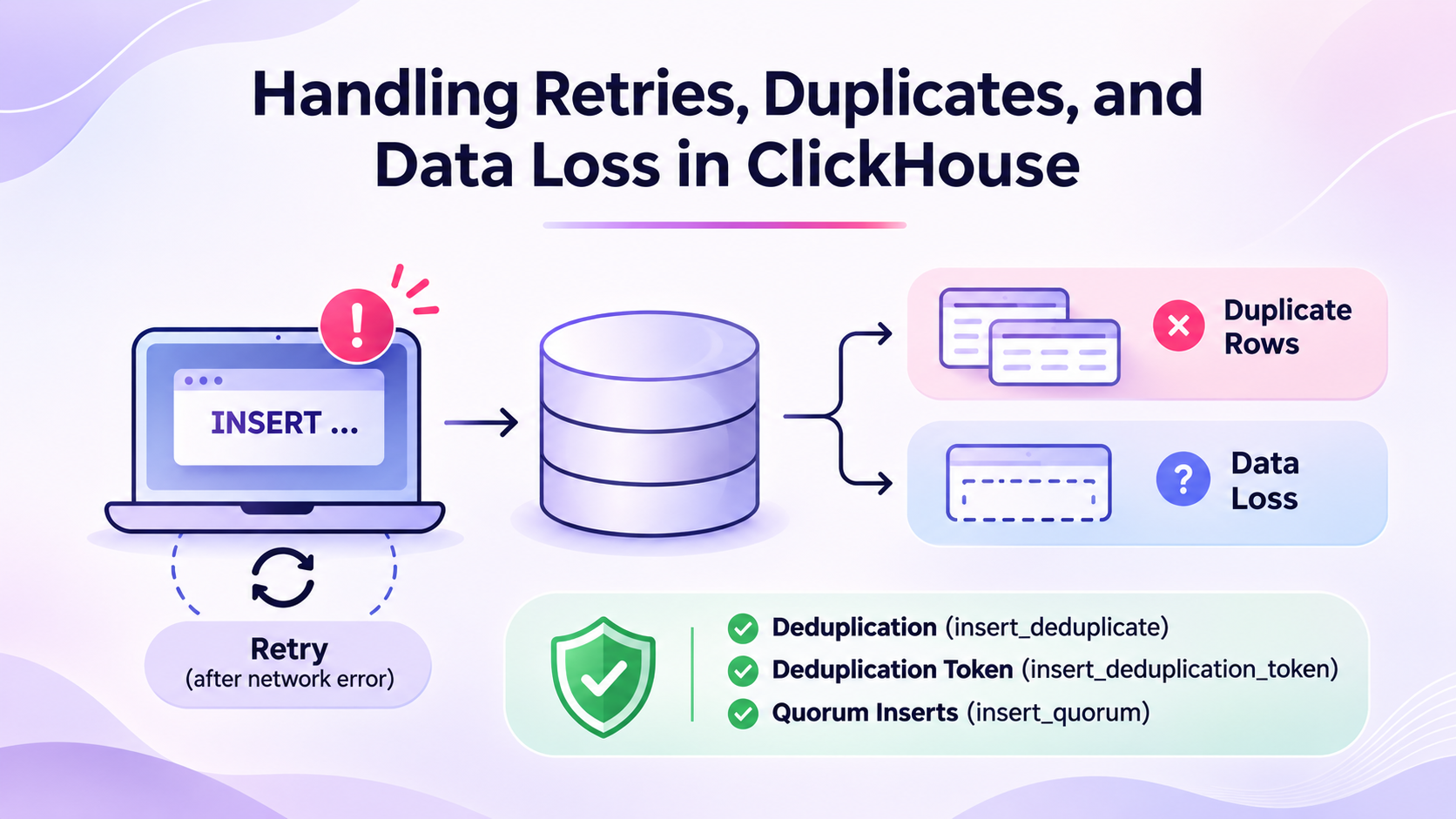
A client can lose its connection while ClickHouse® processes an INSERT. The client may not know whether ClickHouse wrote the data, so the client retries the operation.
After the retry, you see one of two problems:
- The table has duplicate rows.
- A replica does not have the most recent rows.
These look like two different bugs but they have one root cause. The client does not know if the first INSERT worked. This is an uncertain insert result. A client error does not always mean that ClickHouse® did not write the data. This blog explains how ClickHouse® handles INSERT retries, why duplicate rows or data loss can occur, and how to use deduplication and quorum-related settings to make insert operations more reliable.
2. Why it happens
Duplicate rows
ClickHouse® uses block-level deduplication for MergeTree-family tables. It does not use a unique key to check every row.
For replicated tables, ClickHouse® calculates a block ID from the inserted data. It stores the ID in a deduplication log. When a retry produces the same block ID, ClickHouse® can skip the duplicate block. The retry must produce the same data in the same order and with the same block boundaries. A changed batch may produce a different block ID. ClickHouse® can then insert it again.
For example, these batches are not necessarily identical:
- The first batch contains rows 1001 and 1002.
- The retry contains rows 1001, 1002, and 1003.
- The retry contains the same rows in a different order.
- The retry uses different block sizes.
Deduplication also has a finite window. ClickHouse® keeps only the latest hashes. The table setting replicated_deduplication_window sets how many. The setting replicated_deduplication_window_seconds sets how long. An old retry can fall outside the window, so ClickHouse® may not recognize it.
For non-replicated MergeTree tables, deduplication is not enabled by default in the same way. The default is 0, which means off. The table setting non_replicated_deduplication_window controls a local deduplication log.
Lost rows
By default, an INSERT into a replicated table is done when one replica has written the part. The other replicas fetch the part later. If the first replica fails before the fetch, the other replicas do not have the rows. The client got a success reply, so it does not retry.
The quorum setting fixes this. With a quorum, the INSERT waits for a number of replicas.
3. How to confirm
First, inspect the table engine and settings:
SHOW CREATE TABLE events;Check the current session values:
SELECT
    name,
    value,
    changed
FROM system.settings
WHERE name IN
(
    'insert_deduplicate',
    'insert_quorum',
    'insert_quorum_timeout',
    'insert_deduplication_token'
);
The expected values from the specified master-branch defaults are:
insert_deduplicate:1insert_quorum:0insert_quorum_timeout:600000insert_deduplication_token: empty
These values may differ by release. Check the settings on your server.
Next, check whether the table contains duplicate event IDs:
SELECT
    event_id,
    count() AS row_count
FROM events
GROUP BY event_id
HAVING row_count > 1
ORDER BY event_id;
This query helps identify duplicates. It does not prove that a retry caused them. The application may have sent the same event more than once.
If rows appear to be missing, check the replica that received the INSERT and compare its data with other replicas. A read from a lagging replica may not show recent data.
4. The settings
These settings control retry deduplication and quorum inserts.
| Setting | Default | What it controls | Restart needed |
|---|---|---|---|
insert_deduplicate | true | Enables block deduplication for replicated table inserts. [VERIFY] exact 26.8 behavior. | No |
insert_quorum | 0 | Number of replicas that must write the insert. 0 disables quorum. | No |
insert_quorum_timeout | 600000 ms | Maximum time to wait for the quorum write. | No |
insert_deduplication_token | Empty | User-provided token used for duplicate detection instead of the data digest. | No |
These are session settings. Apply them with a settings profile, SET, or the SETTINGS clause.
For replicated tables, the deduplication log is also controlled by replicated_deduplication_window and replicated_deduplication_window_seconds.
For non-replicated tables, use non_replicated_deduplication_window. This setting controls the number of block IDs kept in the local deduplication log. [VERIFY] the default for ClickHouse 26.8 LTS.
5. How to fix it
Fix 1: Retry with exactly the same data
This is the simplest fix. Keep the failed batch. Send it again with no change.
Follow these rules:
- Keep the same rows in the same order.
- Keep the same column values. Do not call now() again.
- Keep the same block settings, such as max_insert_block_size.
- Retry inside the deduplication window.
Use this fix for a replicated table with the default settings. No change is needed.
Fix 2: Use a deduplication token
A token is useful when the client cannot guarantee identical block formation. Use a stable token for each logical batch.
INSERT INTO events VALUES
('2026-11-03 10:00:00', 1001),
('2026-11-03 10:01:00', 1002)
SETTINGS insert_deduplication_token = 'events-batch-20261103-0001';
If the client retries this batch, use the same token:
INSERT INTO events VALUES
('2026-11-03 10:00:00', 1001),
('2026-11-03 10:01:00', 1002)
SETTINGS insert_deduplication_token = 'events-batch-20261103-0001';
Use a new token for each different batch. Do not reuse a token for different data. ClickHouse® uses the token instead of the data digest for duplicate detection. Reusing a token can cause a valid batch to be skipped.
A token also does not remove the need to keep the deduplication log window large enough for the retry period.
Fix 3: Enable quorum writes when durability matters
Set insert_quorum to the majority of your replicas. For three replicas, use 2.
For one query, use the SETTINGS clause.
INSERT INTO events
SETTINGS insert_quorum = 2, insert_quorum_timeout = 60000
SELECT * FROM staging_events;
The value 2 is the majority of three replicas. The timeout is 60000 ms (60 seconds). The default of 600000 ms is long. A shorter timeout makes the client fail early and retry. Pick a value that fits your batch size.
For one session, use SET. SET insert_quorum = 2;
For a dedicated user, use a settings profile in SQL.
CREATE SETTINGS PROFILE critical_ingest
SETTINGS insert_quorum = 2, insert_quorum_timeout = 60000
TO ingest_user;
In users.xml, use a profile in the config file. [VERIFY] The file location on your install.
<clickhouse>
    <profiles>
        <critical_ingest>
            <insert_quorum>2</insert_quorum>
            <insert_quorum_timeout>60000</insert_quorum_timeout>
        </critical_ingest>
    </profiles>
</clickhouse>
A quorum protects writes. It does not make reads consistent. A SELECT can still read from a replica that is behind. To read the data that the quorum confirmed, use select_sequential_consistency. [VERIFY] The default and behavior on your version.
Use a quorum and a deduplication token together. The quorum can time out with an unknown result. You then retry. The token stops the duplicate.
Fix 4: Configure non-replicated deduplication
For a non-replicated MergeTree table, set a positive deduplication window. This stores recent block IDs locally.
For example, when creating a non-replicated table:
CREATE TABLE events
(
    event_time DateTime,
    event_id UInt64
)
ENGINE = MergeTree
ORDER BY event_time
SETTINGS non_replicated_deduplication_window = 1000;
The value 1000 is an example. Choose a window that can cover the expected retry volume. This does not provide replica durability because the table is not replicated.
6. How to verify the fix
Retry the same batch with the same token. Then check the event IDs:
SELECT
    event_id,
    count() AS row_count
FROM events
WHERE event_id IN (1001, 1002)
GROUP BY event_id
ORDER BY event_id;
Each event should appear once for this test.
For quorum inserts, confirm that the INSERT succeeds only after the configured quorum is reached. Test the behavior with a replica unavailable in a non-production environment.
For missing rows, compare the replicas and confirm that the read uses the required consistency behavior.
7. Risks and trade-offs
-
Deduplication is not unlimited. It depends on the deduplication window and on the retry producing the same block or token.
-
A token can prevent duplicate writes, but incorrect token reuse can also suppress valid data. Generate tokens from stable batch identifiers.
-
Quorum inserts improve write durability across replicas. However, they make inserts slower because ClickHouse must wait for multiple replicas.
-
Quorum inserts also fail when enough replicas are unavailable to meet the configured quorum. A timeout does not always mean that the client can safely send a different batch.
-
Do not treat a successful write to one replica as proof that every replica has the data. Choose the write and read consistency settings based on the application’s durability requirements.
8. Summary
- A client network error does not prove that an INSERT failed.
- Retry with the same data, order, and block structure.
- Use a stable deduplication token for each logical batch.
- Use quorum inserts when multiple replicas must confirm the write.
- Monitor deduplication windows and replica availability.