ClickHouse® has traditionally handled data modifications through mutations such as ALTER TABLE ... UPDATE. While this approach works well for large, infrequent changes, it can be expensive for small targeted updates because affected columns in data parts may need to be rewritten.
That's no longer the only option. ClickHouse® now ships a genuine, standard SQL UPDATE statement - the lightweight UPDATE, that updates rows in place without triggering a full part rewrite. Lightweight UPDATE was introduced experimentally in ClickHouse® 25.7 and promoted to Beta in ClickHouse® 25.8. It's currently a beta feature, built around a new concept called patch parts, and it changes the calculus for how you handle row-level corrections in ClickHouse®.
This blog walks through what lightweight UPDATE actually does under the hood, how to use it, and when you should reach for it instead of a mutation.
The Old Way: ALTER TABLE ... UPDATE
ClickHouse® stores data in immutable parts rather than modifying individual rows in place.
Before lightweight UPDATE existed, the only path was:
ALTER TABLE orders
UPDATE status = 'shipped'
WHERE order_id = 12345;
This is a mutation. For a small change, the mutation can still involve rewriting affected columns in the relevant data parts.
Imagine a table containing:
- 100 million rows
- 20 columns
If you need to change one value in one row, rewriting large portions of the affected data can be unnecessarily expensive.
The New Way: Lightweight UPDATE
A lightweight update is a standard SQL UPDATE statement that ClickHouse® handles using a patch-part mechanism.
The lightweight UPDATE statement looks almost identical, minus the ALTER TABLE prefix:
UPDATE [db.]table [ON CLUSTER cluster]
SET column1 = expr1 [, ...]
[IN PARTITION partition_expr]
WHERE filter_expr;
Example:
UPDATE orders
SET discount = 0.20
WHERE order_id = 1001;
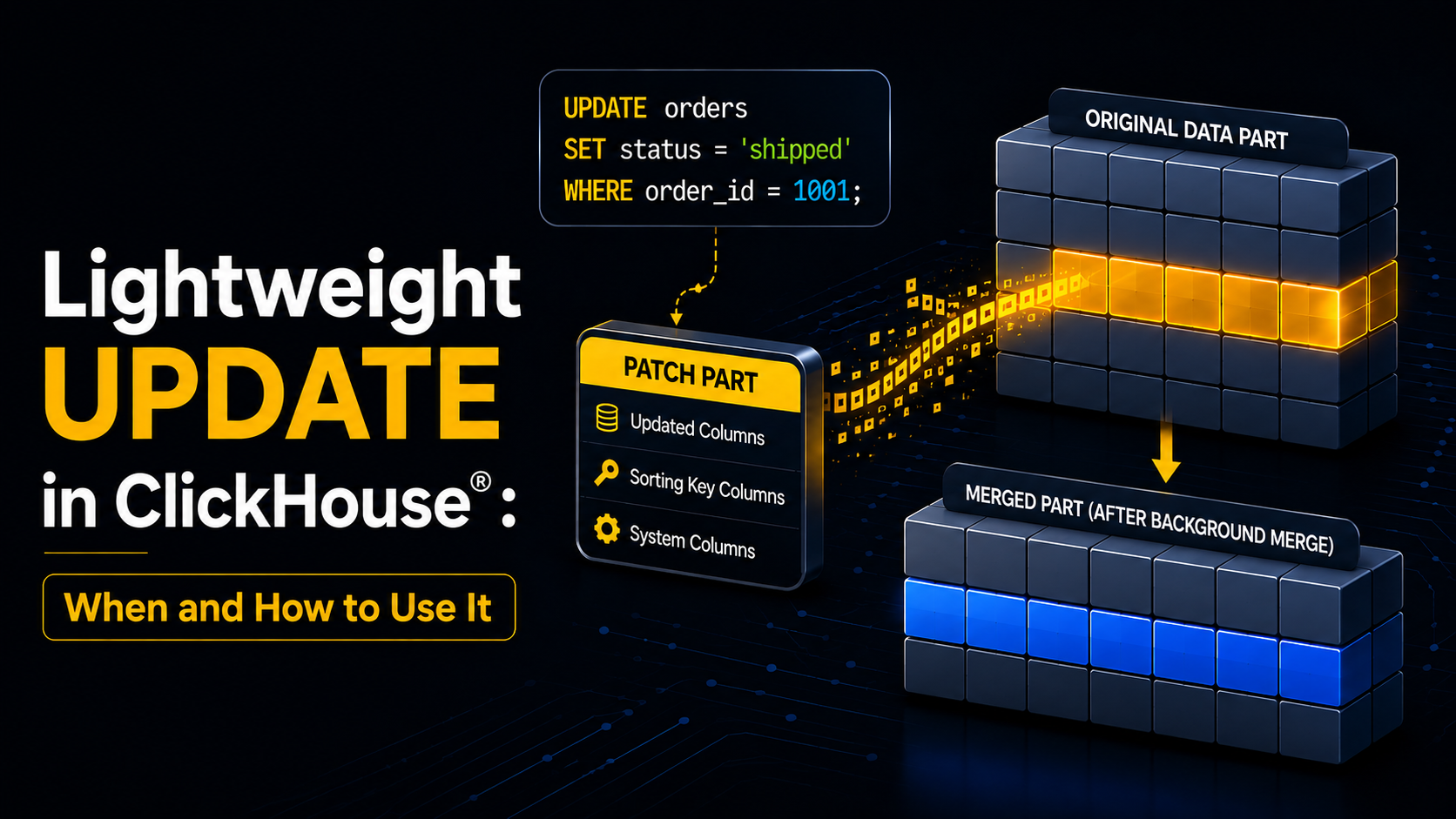
Instead of immediately rewriting the entire affected data part, ClickHouse® creates a small patch containing the changed values and the metadata required to identify the affected rows.
The updated values become visible to queries without requiring the entire underlying data part to be rewritten first. Background merges can later incorporate those changes into the normal data parts.
What a Patch Part Actually Is
The mechanism behind lightweight UPDATE is what makes it lightweight. Instead of rewriting a full data part, ClickHouse® writes a patch part - a small part that contains only:
- The updated columns
- The table's sorting key columns
- A handful of system columns (
_part,_block_number,_block_offset,_data_version) that identify exactly which rows in the original part the patch applies to
When you run the UPDATE, ClickHouse® waits for this patch part to be created before returning - similar in spirit to an INSERT ... SELECT, but scoped to just the changed data. The original data on disk isn't touched yet.
How Updated Data Becomes Visible
This is the part that trips people up, so it's worth being precise about it:
Consider:
UPDATE orders
SET discount = 0.20
WHERE quantity >= 40;
Immediately afterward:
SELECT *
FROM orders
WHERE quantity >= 40;- Updated values are immediately visible in
SELECTqueries, because ClickHouse®applies the patch on read. - The data is only physically materialized into the original part during subsequent merges or mutations.
- Patches are automatically cleaned up once all active parts have them materialized.
So a lightweight UPDATE feels instant from the query side, but the actual on-disk rewrite is deferred and handled opportunistically by the merge process - you get the responsiveness of a write without paying the cost of a rewrite up front. This is often described as patch-on-read.
Requirements Before You Can Use It
Lightweight UPDATE isn't available everywhere. It currently supports:
MergeTreeReplacingMergeTreeCollapsingMergeTreeVersionedCollapsingMergeTree
...along with their Replicated and Shared variants.
Before using lightweight UPDATE, enable the required table settings:
ALTER TABLE my_table MODIFY SETTING enable_block_number_column = 1;
ALTER TABLE my_table MODIFY SETTING enable_block_offset_column = 1;
For older ClickHouse® versions where lightweight UPDATE is still experimental, enable:
SET allow_experimental_lightweight_update = 1;Once the required settings are enabled, you can use the lightweight updates.
Lightweight DELETE, Too
Lightweight DELETE can now also run through this same patch-part mechanism instead of going through an ALTER ... DELETE mutation, controlled by the lightweight_delete_mode setting. If you're already testing lightweight UPDATE, it's worth checking whether your delete path is using it too.
When Lightweight UPDATE Helps
Lightweight updates are particularly useful when the number of changed rows is relatively small compared with the overall table.
For example:
1. Customer profile corrections
UPDATE customers
SET email = 'new@example.com'
WHERE customer_id = 101;
2. Status changes
UPDATE orders
SET status = 'completed'
WHERE order_id = 50001;
3. Small corrections in analytical datasets
UPDATE transactions
SET amount = 1499.50
WHERE transaction_id = 98231;
4. Frequently changing attributes
For example: device status, order status, customer attributes, inventory metadata, configuration values.
These workloads can benefit from lightweight updates because only a relatively small portion of the table changes at a time.
When It Doesn't
Lightweight updates are not a universal replacement for mutations.
Suppose you have:
- 1 billion rows
and your update modifies:
- 700 million rows
A lightweight update is no longer a tiny patch.
The resulting patch can become large, and queries may have to apply more pending changes before those changes are materialized.
For large-scale modifications, a traditional mutation may be a better choice because you can accept the heavier update operation once and then return to a clean baseline for subsequent queries.
A useful rule of thumb is:
Small and frequent changes → lightweight UPDATE
Large and infrequent changes → consider a mutation
The exact threshold depends on the dataset, update distribution, query workload, and merge behavior. ClickHouse's published benchmarks use roughly 10% of a table as a practical guideline for lightweight-update workloads, rather than a hard system limit.
Trade-offs to know about before you commit to it:
SELECTqueries pay a small overhead to apply pending patches- Skipping indexes are bypassed for columns with pending patches, and projections are disabled entirely on a table with any patch parts, even for parts that don't have patches applied
- Firing off too many tiny, frequent updates can lead to a "too many parts" error. Batch them, for example, collect the IDs you need to update into a single
IN (...)clause rather than issuing oneUPDATEper row - It's designed for updating a small slice of a table, roughly up to 10% of rows. Beyond that,
ALTER TABLE ... UPDATEis still the right tool
An End-to-End Example
Here's the full flow, from a raw table to a verified patch application.
1. Create a table with the required settings:
CREATE TABLE orders
(
    order_id UInt64,
    status String,
    updated_at DateTime
)
ENGINE = MergeTree
ORDER BY order_id
SETTINGS enable_block_number_column = 1, enable_block_offset_column = 1;
2. Insert some rows:
INSERT INTO orders VALUES
(1, 'pending', now()),
(2, 'pending', now()),
(3, 'shipped', now());
3. Run a lightweight UPDATE:
UPDATE orders
SET status = 'shipped', updated_at = now()
WHERE order_id IN (1, 2);
4. Verify immediately - no waiting on merges:
SELECT * FROM orders ORDER BY order_id;The updated status and updated_at values show up right away, served through patch application, even though the original part hasn't been rewritten yet.
5. (Optional) Force materialization:
If you need the patch physically merged into the data part right away, say, before running a maintenance job - you can use APPLY PATCHES, which forces materialization as a mutation operation, rather than waiting for the background merge process.
When to Use Which?
- Use lightweight UPDATE for occasional corrections, small batch fixes, or targeted row-level changes where you want the update visible immediately without waiting on a mutation queue.
- Use ALTER TABLE ... UPDATE for bulk changes affecting a large portion of a table.
- Use ReplacingMergeTree (or another append-based upsert pattern) if you're dealing with high-frequency, continuous state changes -lightweight UPDATE is not meant to replace that design pattern.
Traditional Mutation vs Lightweight UPDATE
| Feature | Traditional Mutation | Lightweight UPDATE |
|---|---|---|
| Syntax | ALTER TABLE ... UPDATE | UPDATE ... SET |
| Mechanism | Rewrites affected data | Creates patch parts |
| Data written | More data | Only changed values + metadata |
| Small frequent changes | Less suitable | Well suited |
| Changes visible | Mutation processing dependent | Immediately queryable |
| Background merging | Yes | Yes |
| Query overhead before merge | Generally lower after completion | Can increase temporarily |
| Large bulk updates | Often preferable | Can become expensive |
Lightweight updates are therefore not intended to replace mutations in every workload. They provide another tool for choosing the right update strategy.
Conclusion
Lightweight UPDATE changes the way mutable data can be handled in ClickHouse®.
Instead of treating every update as a large rewrite, ClickHouse® can represent changes as compact patch parts. These patches contain the changed values and targeting metadata, become visible to queries quickly, and are eventually incorporated into normal data parts through background merges.
The biggest takeaway is not:
"Always use lightweight UPDATE."
It is:
Choose the update mechanism based on how much data changes, how frequently it changes, and how sensitive your analytical queries are to temporary patch processing.
It's still beta, so test it against your workload before leaning on it in production, particularly around the projection and skip-index trade-offs. But for the everyday case of "I need to fix a few thousand rows and I need it visible now," it's a genuinely useful addition to the ClickHouse® toolbox.