Introduction
Modern analytical applications often process multilingual text containing accented characters, Unicode symbols, ligatures, and language-specific casing rules. Performing reliable searches or comparisons on such text can be challenging because visually similar strings may have different Unicode representations.
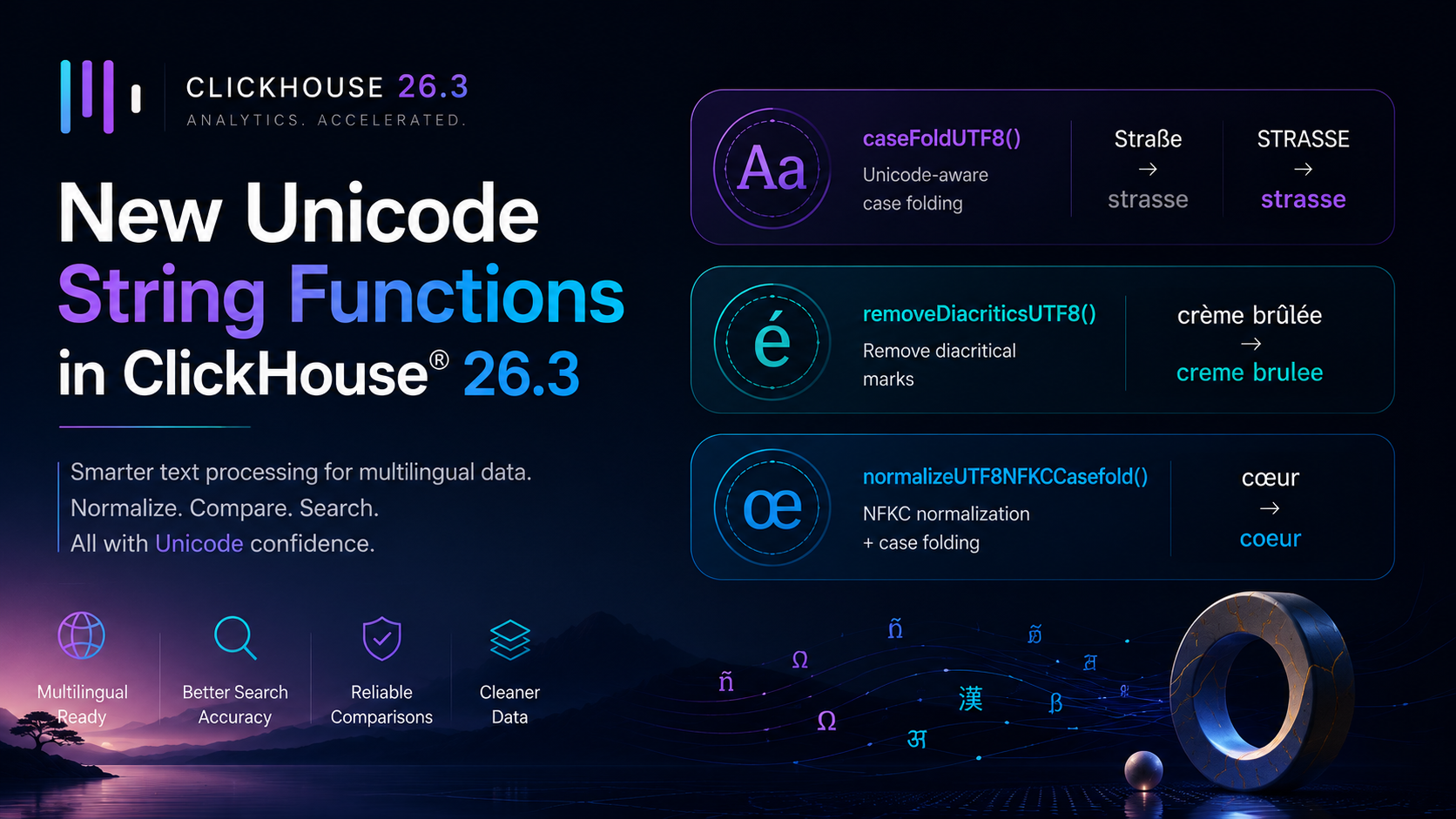
To simplify Unicode-aware text processing, ClickHouse® 26.3 introduces three new string functions:
caseFoldUTF8()removeDiacriticsUTF8()normalizeUTF8NFKCCasefold()
These functions help standardize text for searching, matching, deduplication, and data cleaning while improving compatibility with Unicode standards.
In this blog, we'll walk through the three new Unicode functions introduced in ClickHouse® 26.3 with practical examples for each.
What are Unicode String Functions?
Before diving in, a quick background on why these functions matter.
Text data in the real world is messy, especially when it spans multiple languages:
- The word "résumé" and "resume" should match in a search but won't with simple string comparison
- "Straße" (German for street) and "STRASSE" are the same word but look different to a standard
lower()function - "crème brûlée" and "creme brulee" are the same dish but differ by diacritical marks
- The same character can have multiple Unicode representations that look identical but are stored differently
Unicode normalization and case folding functions solve these problems by standardizing text before comparison, search, or grouping operations.
Without normalization:
- searches may miss matching records,
- duplicate detection becomes unreliable,
- joins may fail unexpectedly.
Existing Unicode Functions in ClickHouse®
Before 26.3, ClickHouse® already had a set of Unicode normalization functions:
| Function | Description |
|---|---|
normalizeUTF8NFC | NFC normalization |
normalizeUTF8NFD | NFD normalization |
normalizeUTF8NFKC | NFKC normalization |
normalizeUTF8NFKD | NFKD normalization |
upperUTF8 | Uppercase for UTF-8 strings |
lowerUTF8 | Lowercase for UTF-8 strings |
ClickHouse® 26.3 adds three new functions on top of these.
New Functions in ClickHouse® 26.3
1. caseFoldUTF8()
What it does: Performs Unicode case folding on a UTF-8 string. Case folding is a more aggressive form of lowercasing, designed specifically for case-insensitive string comparison - it handles special characters that simple lower() cannot.
Example:
SELECT
    caseFoldUTF8('Straße') AS value1,
    caseFoldUTF8('STRASSE') AS value2;
Output:
| value1 | value2 |
|---|---|
| strasse | strasse |
Comparison:
SELECT caseFoldUTF8('Straße') = caseFoldUTF8('STRASSE') AS is_equal;Output:
| is_equal |
|---|
| 1 |
In standard SQL, lower('Straße') returns 'straße' - which does NOT equal lower('STRASSE') = 'strasse'. The German letter ß lowercases to ß but case-folds to ss. caseFoldUTF8 handles this correctly.
Practical use case - case-insensitive search across multilingual data:
SELECT
    user_id,
    name,
    country
FROM default.users
WHERE caseFoldUTF8(name) = caseFoldUTF8('müller');
This will correctly match Müller, MÜLLER, müller, and MüLLeR - regardless of how the name was entered.
Another example:
SELECT
    caseFoldUTF8('Hello World') AS folded_english,
    caseFoldUTF8('HÉLLO WÖRLD') AS folded_accented,
    caseFoldUTF8('Ω') AS folded_greek;
Output:
| folded_english | folded_accented | folded_greek |
|---|---|---|
| hello world | héllo wörld | ω |
2. removeDiacriticsUTF8()
What it does: Removes diacritical marks (accents) from UTF-8 characters, returning the base character without any accent marks.
Example:
SELECT removeDiacriticsUTF8('crème brûlée') AS without_accents;Output:
| without_accents |
|---|
| creme brulee |
More examples:
SELECT
    removeDiacriticsUTF8('résumé') AS example_1,
    removeDiacriticsUTF8('naïve') AS example_2,
    removeDiacriticsUTF8('São Paulo') AS example_3,
    removeDiacriticsUTF8('Zürich') AS example_4;
Output:
| example_1 | example_2 | example_3 | example_4 |
|---|---|---|---|
| resume | naive | Sao Paulo | Zurich |
Practical use case - accent-insensitive search:
-- Find all cities regardless of accent spelling
SELECT city, country, population
FROM default.cities
WHERE removeDiacriticsUTF8(lowerUTF8(city)) = removeDiacriticsUTF8(lowerUTF8('sao paulo'));
This will match São Paulo, Sao Paulo, SAO PAULO, and são paulo.
3. normalizeUTF8NFKCCasefold()
What it does: Combines two operations in one:
- NFKC Unicode normalization
- Unicode case folding
This is the most aggressive string normalization function and is ideal for situations where you need to compare strings that may differ in case, Unicode form, compatibility characters, and diacritical handling.
What NFKC normalization does:
NFKC (Normalization Form Compatibility Composition) converts compatibility characters to their canonical equivalents. For example:
- The ligature "œ" (a single character, as in "cœur") becomes "oe" (two separate characters)
- Full-width characters like "A" become regular "A"
- Superscript numbers like "²" become "2"
Example:
SELECT normalizeUTF8NFKCCasefold('cœur') AS normalized;Output:
| normalized |
|---|
| coeur |
The ligature "œ" is converted to "oe" and case folding is applied.
More examples:
SELECT
    normalizeUTF8NFKCCasefold('A B C') AS fullwidth_example,
    normalizeUTF8NFKCCasefold('2²') AS superscript_example,
    normalizeUTF8NFKCCasefold('Straße') AS german_example;
Output:
| fullwidth_example | superscript_example | german_example | |---|---|---|---| | a b c | 22 | strasse |
Practical use case - normalizing user-submitted text before storing:
SELECT
    user_id,
    normalizeUTF8NFKCCasefold(search_query) AS normalized_query
FROM default.search_logs
WHERE normalizeUTF8NFKCCasefold(search_query) = normalizeUTF8NFKCCasefold('café')
LIMIT 10;
This will match café, CAFÉ, cafe, CAFE, Café, and even variants with compatibility characters.
Comparison: Which Function to Use?
| Function | Primary Purpose | Typical Use Case |
|---|---|---|
caseFoldUTF8() | Unicode-aware case comparison | Case-insensitive matching |
removeDiacriticsUTF8() | Removes accents | Search normalization |
normalizeUTF8NFKCCasefold() | Full Unicode normalization | Deduplication and equality checks |
Also New in 26.3: Natural Sorting
While not a Unicode normalization function, ClickHouse® 26.3 also introduced naturalSortKey() - a function for human-friendly string sorting:
SELECT name
FROM files
ORDER BY naturalSortKey(name);
Output:
| name |
|---|
| file1.txt |
| file2.txt |
| file10.txt |
| file20.txt |
| file100.txt |
Without naturalSortKey, file10.txt would sort before file2.txt because standard string sorting compares character by character. naturalSortKey recognizes the numeric parts and sorts them naturally.
Quick Reference
| Function | Example Input | Output |
|---|---|---|
caseFoldUTF8() | 'Straße' | 'strasse' |
caseFoldUTF8() | 'MÜLLER' | 'müller' |
removeDiacriticsUTF8() | 'crème brûlée' | 'creme brulee' |
removeDiacriticsUTF8() | 'São Paulo' | 'Sao Paulo' |
normalizeUTF8NFKCCasefold() | 'cœur' (with ligature) | 'coeur' |
normalizeUTF8NFKCCasefold() | 'Straße' | 'strasse' |
naturalSortKey() | 'file10.txt' | sorts after file2.txt |
Best Practices
- Use
caseFoldUTF8()for case-insensitive comparisons on multilingual text - it is more reliable thanlowerUTF8()for non-ASCII characters. - Use
removeDiacriticsUTF8()when you want to match words regardless of accent marks - common for name searches and geographic data. - Combine both for maximum search flexibility:
removeDiacriticsUTF8(caseFoldUTF8(column)). - Use
normalizeUTF8NFKCCasefold()when dealing with data from external sources that may use compatibility characters, ligatures, or full-width characters. - Store normalized columns as
MATERIALIZEDcolumns - compute the normalization once at insert time rather than on every query.
Final Thoughts
The new Unicode string functions in ClickHouse® 26.3 - caseFoldUTF8, removeDiacriticsUTF8, and normalizeUTF8NFKCCasefold - make it significantly easier to work with international and multilingual text data. Together, they provide a complete toolkit for accent-insensitive and case-insensitive string operations that go beyond what simple lower() or upper() can handle.
If your ClickHouse® tables contain names, addresses, product descriptions, or any user-submitted text from international sources, these functions are well worth adding to your query toolkit.